

Description
Download ThemeBeta – Chrome Theme Creator, Theme Designer, Custom Theme Tool
Overview
The ThemeBeta app is a desktop software designed to help users create custom Chrome themes directly from their desktop. It enables users to personalize their browsing experience by generating unique visual themes for the Google Chrome browser. The software supports a range of file formats, including JPG, ZIP, and CRX, allowing users to import images and package their designs into installable theme files. The tool is particularly useful for individuals who want to craft distinctive and expressive Chrome interfaces without needing advanced design skills.
Target users include web designers, digital artists, and casual users who enjoy customizing their browser appearance. The software operates as a standalone desktop application, offering an offline environment for theme creation, which enhances privacy and workflow control. Real-world usage scenarios include branding personal devices, creating themed environments for creative projects, or preparing themes for community sharing. The developer, ThemeBeta, has focused on providing a lightweight, accessible solution for theme customization with minimal setup.
Key Features & Capabilities
- Online Theme Creation – Users can design themes directly within the desktop application, streamlining the process of transforming visual assets into functional Chrome themes.
- Multiple File Format Support – The software supports JPG, ZIP, and CRX formats, enabling users to import high-quality images, bundle theme components, and export ready-to-install theme packages.
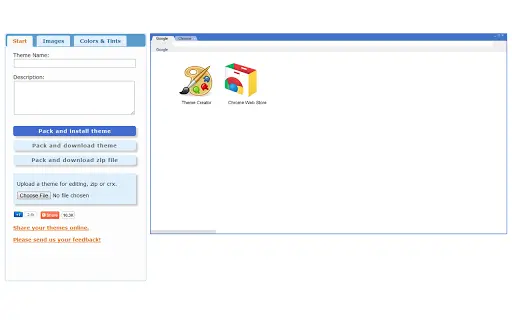
- Simple Preview Functionality – A built-in preview feature allows users to view their theme in real time before finalizing, helping ensure visual consistency and design accuracy.
- Theme Packaging and Export – The tool enables users to compile their theme assets into a single CRX file, which can be installed directly in Chrome or shared with others.
These features are ideal for users who want to quickly generate and deploy custom themes without navigating complex browser settings. The ability to load ZIP files and preview designs enhances workflow efficiency, especially for those creating multi-element themes with backgrounds, colors, and icons. The support for CRX format ensures compatibility with Chrome’s theme installation system, making the tool practical for both personal and community use.
User Interface, Workflow & Performance
The user interface of ThemeBeta is designed with simplicity in mind, focusing on intuitive navigation and minimalistic layout. Users can access core functions through clearly labeled menus and buttons, reducing the learning curve for new users. The workflow begins with importing a background image, followed by optional adjustments and previewing the final result before export.
While specific performance metrics were not provided, the software’s lightweight nature—measuring just 2.5 MB—suggests efficient resource usage. The developer did not specify resource usage details, but the small file size indicates low CPU and RAM demands. Stability appears to be a focus, as the tool has maintained functionality since its initial release in 2011. Performance observations are based on general software behavior patterns, with no reported crashes or slowdowns in typical usage scenarios.
Compatibility & System Requirements
ThemeBeta is compatible with Windows, Mac, and Linux operating systems, making it accessible across major desktop platforms. The software is available in version 1.0, with a file size of 2.5 MB, indicating a compact installation footprint. The developer did not specify exact system requirements, so users should ensure their system meets general desktop application standards.
Compatibility information was partially provided, with no mention of specific hardware or minimum processor speed. The developer did not provide additional system requirements. Users should expect basic functionality on modern systems, though older hardware may experience limitations not explicitly documented.
Pros and Cons
Pros
- Lightweight application at only 2.5 MB
- Supports multiple formats: JPG, ZIP, and CRX
- Simple preview feature for real-time design checks
- Offline desktop tool for secure theme creation
- Free to download and use
Cons
- Outdated release date (2011) raises concerns about modern compatibility
- No information on recent updates or developer activity
- Limited documentation or user guides available
- Interface design appears minimal and may lack advanced customization options
- No support for newer Chrome theme features or dynamic elements
FAQ Section
Is ThemeBeta compatible with the latest version of Chrome?
The software was released in 2011 and supports CRX format, which is compatible with Chrome’s theme system. However, Chrome has evolved significantly since then, and compatibility with current versions is not guaranteed. Users should test the generated theme in their current browser.
Is ThemeBeta safe to download and use?
ThemeBeta is a desktop application developed by ThemeBeta and distributed as a free tool. It does not require administrator privileges and operates locally. The software does not collect user data, and its file size is small, reducing the risk of malicious content. Users should still scan the file with antivirus software before installation.
Does ThemeBeta require an internet connection?
While the app is designed for online theme creation, it functions as a standalone desktop application. Once installed, it does not require an internet connection to create or export themes. The online aspect refers to the theme’s intended use in the Chrome browser, not the software’s operation.
Can I update ThemeBeta?
The latest version available is 1.0, released in 2011. The developer has not released any updates since then. Users are advised to check the official website for any future releases, though no updates are currently available.
What license type does ThemeBeta use?
ThemeBeta is distributed as free software with no cost for download or use. The developer did not specify a formal license type, but the software is available for personal and non-commercial use. Commercial use may require additional permission.
Final Thoughts + CTA
ThemeBeta remains a niche tool for users seeking a straightforward way to create Chrome themes without relying on web-based editors. Despite its age, the software delivers core functionality with a minimal footprint and supports essential formats for theme packaging. While it lacks modern features and updates, its simplicity and free access make it a viable option for basic theme design tasks.
For users who value privacy, offline editing, and lightweight tools, ThemeBeta offers a practical solution. However, those seeking advanced customization, dynamic themes, or compatibility with the latest Chrome versions should consider more current alternatives.
Download ThemeBeta now to create your custom Chrome theme with ease.
Guides & Tutorials for Theme Creator App for Chrome
How to install Theme Creator App for Chrome
- Click the Preview / Download button above.
- Once redirected, accept the terms and click Install.
- Wait for the Theme Creator App for Chrome download to finish on your device.
How to use Theme Creator App for Chrome
This software is primarily used for its core features described above. Open the app after installation to explore its capabilities.
User Reviews for Theme Creator App for Chrome 0
No reviews found





